


· Johannes Millan · 6 min read
Super Productivity vs. Clockify: The Developer Comparison
When looking for a free time tracker, Clockify is often the first name that comes up. It gained massive popularity by offering unlimited users for free. However, for software developers, “tracking time” is often just one part of a larger workflow involving Jira tickets, GitHub issues, and the need for deep focus. Developers don’t just struggle with time tracking – they struggle with interruptions, ticket hopping, and losing their place in complex work. Super Productivity approaches the problem differently: it’s not just a timesheet – it’s a personal productivity workstation designed to keep you in the flow.
In this comparison, we’ll look at how Clockify and Super Productivity stack up for developers and individual contributors.
TL;DR: Which one fits your workflow?
- Clockify: Best for teams and managers who need to track billable hours, generate payroll reports, and monitor employee attendance across a company.
- Super Productivity: Best for individual developers and freelancers who want to integrate time tracking directly with their coding tasks (Jira/GitHub) without sharing data.
⏱️ The Contenders
Clockify: The Team Timesheet
Clockify is a cloud-based time tracker that became famous for its “free for unlimited users” model. It focuses heavily on timesheets, billable hours, and reporting.
- Best for: HR, Project Managers, and teams needing a unified view of everyone’s hours.
- Core Philosophy: Centralized, cloud-based time tracking for teams and businesses.
Super Productivity: The Developer’s Station
Super Productivity is an open-source (MIT licensed) personal productivity suite. It focuses on the individual’s workflow, combining ToDo management, time tracking, and deep work tools into one local-first application.
- Best for: Developers, designers, and anyone managing their own complex workflows.
- Core Philosophy: Privacy-first, offline-first, and integrated into the “doing” of work.
⚔️ Feature Comparison
| Feature | Clockify | Super Productivity |
|---|---|---|
| Primary Use Case | Timesheets & Team Reporting | Personal Task Planning & Deep Work |
| Data Privacy | Cloud-based (Data on their servers) | Local-First (Data on your device; you own it) |
| Account Required | Yes (Email/SSO) | No (unless using 3rd party sync) |
| Issue Tracker Sync | Browser Extension (Surface level) | Issue Import (Jira, GitHub, GitLab, OpenProject) |
| Offline Capability | Partial (Mobile/Desktop apps sync later) | Local-First (Always works offline) |
| Focus Tools | Timer-based | Flow-centric (Timer + Task context) |
| Automation | API / Zapier | Worklog Sync (Jira, GitLab, OpenProject) |
| Extensibility | API / Integrations | Open Source (Scripts, Styles, Plugins) |
| Data Format | Proprietary Cloud DB | JSON (Fully exportable & editable) |
| Pricing | Free Basic + Paid Tiers ($4-$12/mo) | 100% Free & Open Source |
🧠 Why This Matters: The Developer Workflow
The biggest cost for a developer isn’t the software subscription – it’s context switching.
Clockify (and similar tools) often force you to break your flow:
- Stop coding.
- Switch app (Browser or Dashboard).
- Find the project.
- Type “Fixing bug #123”.
- Start timer.
Super Productivity eliminates this friction. Because it integrates with Jira, GitHub, and GitLab, your tasks are already there. You simply click “play” on the issue you’re working on. Switching between IDE → Timesheet App → Jira breaks concentration. Super Productivity keeps the timer, the issue, and the workflow in one place. When you’re done, the time can be configured to sync back to the ticket’s worklog (for Jira, GitLab, and OpenProject). You never have to manually fill out a timesheet at the end of the week. It respects your Deep Work sessions by handling the admin work in the background.
🔍 Deep Dive: Key Differences
1. Privacy & Data Sovereignty
Clockify is a SaaS product. Your data resides on their servers. For many corporate environments, this is fine. But for privacy-conscious developers or those under strict NDAs, sending detailed work logs to a third-party cloud is a no-go.
Super Productivity is Local-First. Your data never leaves your machine unless you explicitly configure a sync provider (like your own Nextcloud, Google Drive, or WebDAV). You have full control over where your data lives.
2. Beyond Just “Tracking”
Clockify asks: “How much time did you spend?”
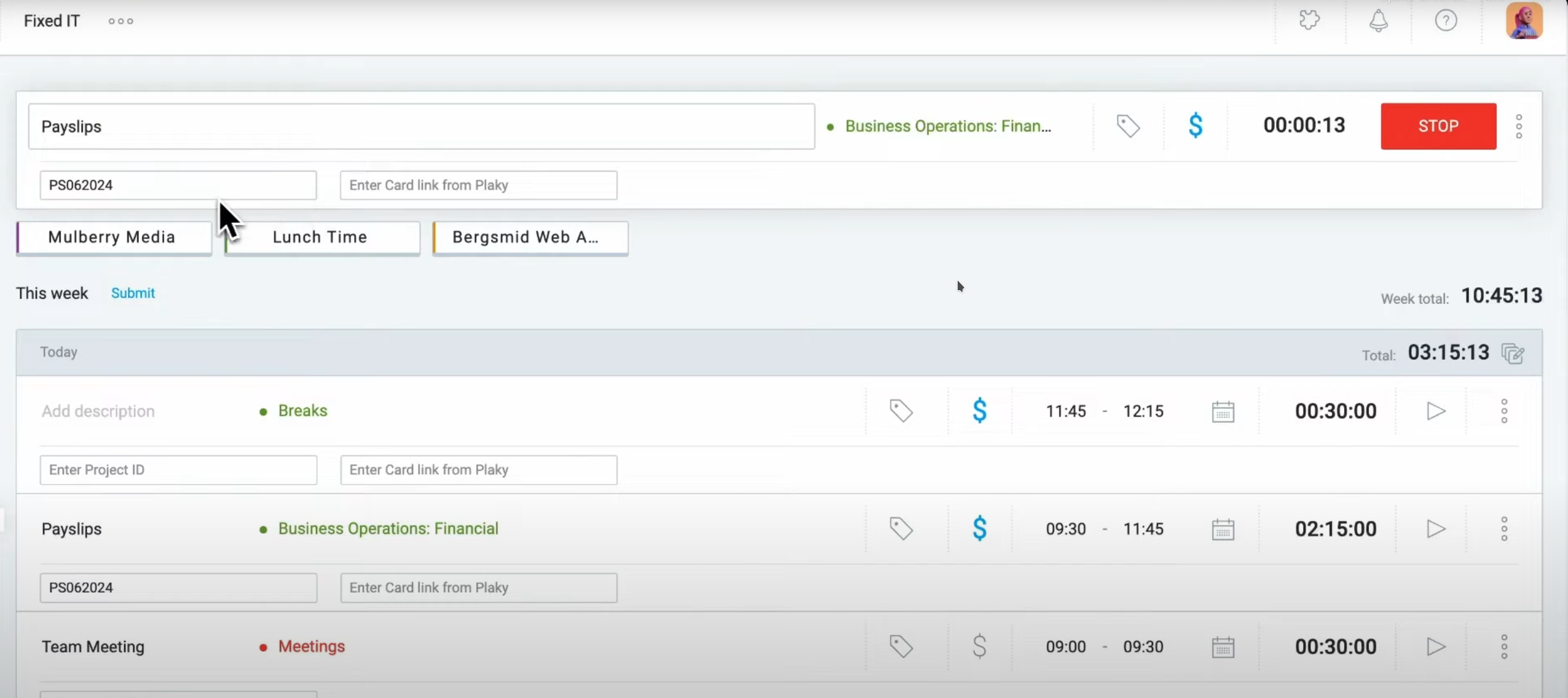 Above: Clockify’s interface focuses on manual time entry and timesheets.
Super Productivity asks: “What do you need to get done today?”
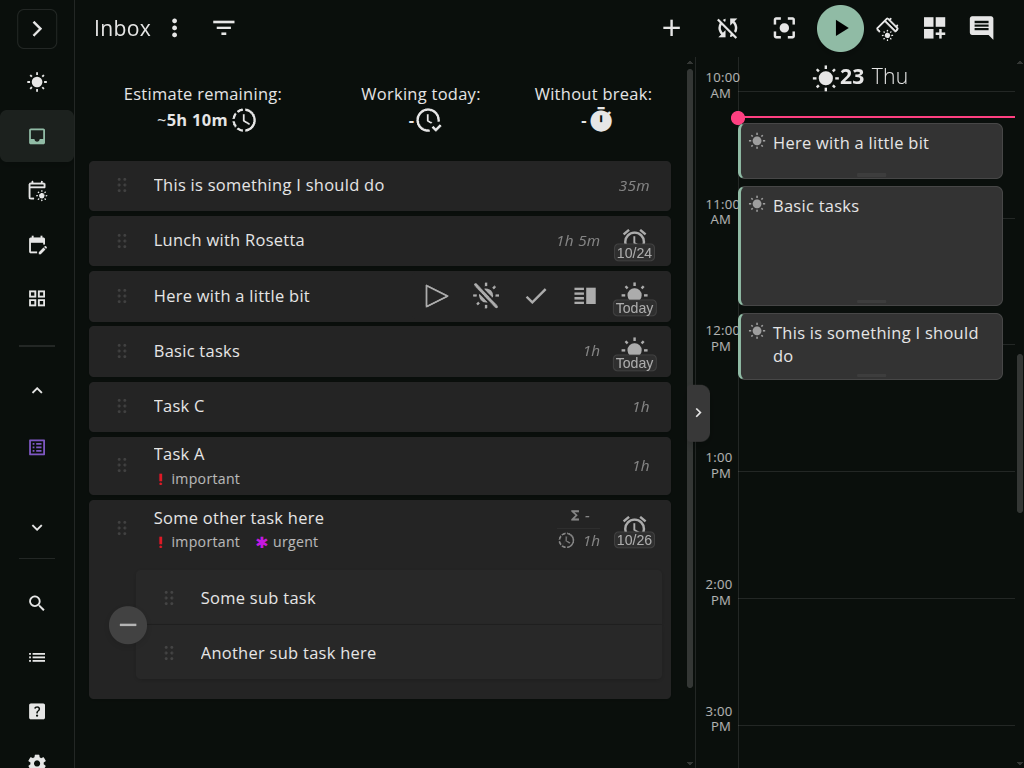 Above: Super Productivity combines your daily plan, task list, and timer in one view.
Super Productivity includes:
- Daily Planning: A dedicated view to plan your day before you start.
- Anti-Procrastination: Features that help you break down overwhelming tasks.
- Healthy Habits: Reminders to take breaks, stretch, and step away from the screen.
3. Open Source & Extensibility
Clockify is proprietary. While they have a free tier, they have gradually moved more advanced features behind paid subscriptions.
Super Productivity is 100% Open Source. The code is on GitHub. It is highly extensible – you can create custom themes, write scripts, or contribute plugins to adapt the tool to your specific workflow. There are no paywalls and no “Enterprise” tiers.
⚖️ Where Clockify Wins
Clockify is the better choice in specific organizational contexts:
- Team Management: If you need to see a dashboard of 50 employees’ hours to approve payroll, Clockify is designed for that. Super Productivity has no “Manager View” because it’s a personal tool.
- Shared Projects: Clockify makes it easy to define a project once and have everyone track time to it. In Super Productivity, projects are local to the user.
- Kiosk Mode: Clockify supports shared devices for clocking in/out, which is essential for some physical workplaces.
🔄 Migration: Switching is Easy
Worried about lock-in? You can start using Super Productivity without even creating an account.
- Download: Install the app or use the web version.
- Import: You can import tasks from a JSON file or simply connect your issue provider (Jira/GitHub/GitLab) to populate your list instantly.
- Export anytime: All data is stored in readable JSON files, so you are never locked in.
- Safe Trial: Since data is local, you can try it alongside Clockify for a day. If you like it, keep using it. If not, delete the folder – no data remains in the cloud.
🏆 The Verdict
- Clockify is a strong choice for organizations that need centralized timesheets and payroll reporting.
- Super Productivity is the superior choice for people who actually write code.
If you want a tool that respects your privacy, automates your Jira/GitHub logs, and helps you stay in the flow, Super Productivity is the developer-first alternative you’ve been looking for.
🚀 Take Control of Your Time
Stop renting your time tracker. Own your workflow with Super Productivity. No account required (unless you choose to sync via Dropbox/Drive etc). Start working immediately.
- Download Free for Linux, macOS, and Windows.
- Explore the Guide to master your daily flow.
- Compare more tools in our hub.
Related resources
Keep exploring the topic
Integration Directory
Connect Jira, GitHub, GitLab, and CalDAV in a few clicks–no extra glue code required.
Read moreCompare Hub
Neutral breakdowns of Super Productivity vs Toggl, Clockify, Todoist, and other staples.
Read moreGetting started with Super Productivity
Learn how to use Super Productivity effectively with this comprehensive guide covering task management, time tracking, and productivity techniques.
Read moreStay in flow with Super Productivity
Plan deep work sessions, track time effortlessly, and manage every issue with the open-source task manager built for focus. Concerned about data ownership? Read about our privacy-first approach.

About the Author
Johannes is the creator of Super Productivity. As a developer himself, he built the tool he needed to manage complex projects and maintain flow state. He writes about productivity, open source, and developer wellbeing.