Official Comparison Hub

Compare Super Productivity with Todoist, Sunsama, Things 3, Reclaim.ai & More

Super Productivity is a focused open-source alternative to Todoist, Sunsama, Things 3, TickTick, Notion, Toggl Track, Clockify, Reclaim.ai, Obsidian Tasks, and Pomofocus. This page shows exactly how features, pricing, privacy, and workflows differ so you can pick the tool that protects your focus.

Snapshot

  • No in-app tracking

    No in-app analytics or telemetry. Tasks, notes, and time data stay on your devices unless you configure sync.

  • Tasks + time together

    Timeboxing, Pomodoro, and analytics live beside your backlog.

  • Developer integrations

    Deep GitHub, GitLab, and Jira links keep commits tied to time.

  • Fair, predictable pricing

    Free, open-source desktop + mobile apps with optional sponsorship.

Feature comparison

See the tradeoffs at a glance

Use this table to benchmark Super Productivity against five popular tools before diving into the in-depth sections below. For Sunsama, Things 3, Reclaim.ai, Obsidian Tasks, and Pomofocus comparisons, see their dedicated pages.

FeatureSuper ProductivityTodoistTickTickNotionToggl TrackClockify
Open-sourceYes (MIT license, auditable)NoNoNoNoNo
Local-first storageLocal database with optional syncCloud-based; local cache for offline useCloud-centric; seamless sync across devicesCloud-based; offline mode available (manual setup on free plans)Cloud-based; desktop/mobile apps support offline tracking with later syncCloud-based; desktop/browser apps support offline tracking with later sync
Offline useFull offline for tasks, timers, and notes (sync is optional)Offline editing with later sync (requires prior login)Primarily cloud-based; mobile apps typically cache tasks offlineOffline mode for manually enabled pages; auto-download on paid plansOffline time tracking with sync when onlineOffline time tracking; new entries sync when online
Built-in time trackingYes – native timer + analyticsNo (needs integrations)Yes – Focus/Pomodoro timer with focus-time stats (not a full billing tracker)No (needs Toggl, Clockify, or manual properties)Yes (core feature)Yes (core feature)
Pomodoro / timeboxingYes – integrated Pomodoro + timeboxing (calendar blocks)No native Pomodoro; can be approximated via labels/filters + external toolsYes – built-in Pomodoro/focus timerNo native Pomodoro; requires external tools or widgetsYes – Pomodoro in desktop app/extensionYes – Pomodoro timer plus focus-support features in desktop/browser apps
IntegrationsGitHub, GitLab, Jira, Gitea, Redmine, OpenProject, CalDAV, Google Calendar, custom scriptsExtensive SaaS integrationsProductivity + calendar appsNative synced databases for GitHub, GitLab, Jira, Asana (read-only)Calendars, PM tools, ZapierCalendars, PM tools, Zapier
PriceFree (optional sponsorship)Subscription (per user)Subscription (per user)Free tier; paid for teams and advanced featuresSubscription (per seat)Free tier + paid seats
Privacy postureNo telemetry, data stays with youCloud-hosted; uses cookies and analytics as described in their privacy policyCloud-hosted; uses cookies and analytics as described in their privacy policyCloud-hosted; uses cookies and analytics as described in their privacy policyCloud-hosted; uses cookies and analytics as described in their privacy policyCloud-hosted; uses cookies and analytics as described in their privacy policy

* Information compiled from public product documentation at the time of writing. Double-check pricing or feature limits before migrating critical workflows.

Want the local-first deep work stack?

Download Super Productivity, import a sample project, and compare it to your current tracker side-by-side. Most people can tell which tool fits after a single focused workday.

Head-to-head breakdowns

Choose the tool that matches your intent

Each comparison below covers the same four angles: who the competitor serves best, which features they own, where Super Productivity takes the lead, and how to decide quickly without guesswork.

Super Productivity vs Todoist

Overview. Todoist is a polished, cloud-based list manager that shines for teams who want collaborative projects, automations, and templated routines available anywhere.

Where Todoist wins. Shared workspaces, natural-language task capture, and a big ecosystem of integrations make Todoist easy to plug into SaaS-heavy teams.

Where Super Productivity wins. You get offline-first boards, Pomodoro, timeboxing, and integrated timers without relying on third-party services or leaking telemetry.

Choose Todoist if… you rely on manager dashboards, multi-level permissions, or centralized task QA in the cloud.

Choose Super Productivity if… you need ownership over your backlog, want time tracking beside tasks, and prefer a distraction-free workspace for deep work.

Super Productivity vs TickTick

Overview. TickTick wraps gamified streaks, habit tracking, and calendar embeds into a single SaaS planner focused on motivating consistency.

Where TickTick wins. Built-in habits, white-noise focus sounds, and built-in email-to-task capture appeal to users who like nudges and rewards.

Where Super Productivity wins. You get privacy-first Pomodoro, flexible timeboxing, and no requirement to sync through a vendor account.

Choose TickTick if… you want lightweight habits, health widgets, and are comfortable with cloud storage plus subscriptions.

Choose Super Productivity if… you prefer gentle structure without gamification, need stronger developer integrations, or want to keep data on-device.

Super Productivity vs Notion

Overview. Notion is a flexible docs-and-databases platform that many teams use for wikis, project tracking, and knowledge management.

Where Notion wins. Relational databases, nested pages, real-time collaboration, native GitHub/Jira synced databases, and a single workspace for docs and projects.

Where Super Productivity wins. Native time tracking with automatic issue attribution, Pomodoro, zero-setup offline mode, and no cloud account required.

Choose Notion if… your team lives in shared wikis, you need relational databases, or you want one tool for docs and projects.

Choose Super Productivity if… you want focused task execution with time logged per issue, Pomodoro, and privacy-first offline mode.

Super Productivity vs Toggl Track

Overview. Toggl Track is a dedicated time-tracking SaaS product with invoicing, team reporting, and rich dashboards for billing-focused businesses.

Where Toggl Track wins. Detailed reports, client cost codes, and approval workflows are built for agencies that live in spreadsheets.

Where Super Productivity wins. Tasks, timers, and daily planning live together, so you never context switch between a list app and a tracker.

Choose Toggl Track if… you need centralized admin oversight, client billing audits, or dozens of teammates submitting timesheets.

Choose Super Productivity if… you want integrated task planning + tracking, offline mode, and data portability for solo or small-team deep work.

Super Productivity vs Clockify

Overview. Clockify offers a generous free tier for time tracking plus paid add-ons for scheduling, approvals, and expense management.

Where Clockify wins. It provides team scheduling, invoices, and GPS-enabled mobile logs for field teams that must prove billable hours.

Where Super Productivity wins. You keep local control, eliminate SaaS dependencies, and get Pomodoro, backlog grooming, and analytics without extra modules.

Choose Clockify if… you require centralized management of dozens of contractors or need to integrate with payroll and HR systems.

Choose Super Productivity if… you care more about calm deep-work sessions, developer tooling, and avoiding time-tracker context switching.

Super Productivity vs Sunsama

Overview. Sunsama is a cloud-based daily planner with guided morning/evening rituals, timeboxing, and integrations with Asana, Todoist, Slack, and developer tools like Jira and GitHub.

Where Sunsama wins. Its structured daily planning ritual walks you through task import, estimation, and calendar placement. Great for people who need help starting their day.

Where Super Productivity wins. You get the same timeboxing and Pomodoro tools for free, with deeper Jira/GitHub worklog sync, full offline support, and no cloud dependency.

Choose Sunsama if… you want guided rituals, pull tasks from many SaaS tools, and don't mind $20/month for cloud-only storage.

Choose Super Productivity if… you want the same planning power for free, with local data, offline mode, and bidirectional issue-tracker sync.

Super Productivity vs Things 3

Overview. Things 3 by Cultured Code is a premium, one-time-purchase task manager known for elegant design and fast keyboard-driven navigation. Apple platforms only.

Where Things 3 wins. Design quality, speed, and deep Apple ecosystem integration (Siri, Shortcuts, Apple Watch) make it the gold standard for minimalist personal task management.

Where Super Productivity wins. Cross-platform support (Linux, Windows, Android), built-in time tracking, Pomodoro, and Jira/GitHub integration — plus it's free and open source.

Choose Things 3 if… you're all-in on Apple, want the most polished UX, and don't need time tracking or developer integrations.

Choose Super Productivity if… you use multiple platforms, need built-in timers, or want open-source software with issue-tracker sync.

Super Productivity vs Reclaim.ai

Overview. Reclaim.ai uses AI to auto-schedule tasks, habits, and focus blocks on your Google Calendar or Outlook, continuously reoptimizing as meetings arrive.

Where Reclaim.ai wins. AI-driven scheduling defends focus time automatically. Smart 1:1s, habits, and no-meeting days require zero manual calendar management.

Where Super Productivity wins. Manual timeboxing gives you full control, with built-in time tracking, Jira worklog sync, and offline support — no cloud dependency or calendar access needed.

Choose Reclaim.ai if… your calendar is meeting-heavy and you want AI to protect focus time without manual planning.

Choose Super Productivity if… you prefer deliberate planning, need Jira/GitHub integration, and want privacy-first offline-capable software.

Super Productivity vs Obsidian Tasks

Overview. Obsidian is a local-first note-taking app; the Tasks community plugin adds due dates, priorities, and query-powered task views across your vault.

Where Obsidian wins. Linked notes, graph view, and plain markdown files make it a genuine knowledge base. Tasks embedded in notes stay in context alongside research and documentation.

Where Super Productivity wins. Purpose-built task execution with time tracking, Pomodoro, daily planning, and Jira/GitHub sync — no plugin configuration or query syntax needed.

Choose Obsidian if… you already use it for PKM and want tasks alongside notes with maximum customizability.

Choose Super Productivity if… you want a ready-to-use task manager with built-in timers and developer integrations that works out of the box.

Super Productivity vs Pomofocus & Forest

Overview. Pomofocus is a browser-based Pomodoro timer with a basic task list. Forest gamifies focus by growing virtual trees while you stay off your phone.

Where standalone focus tools win. Instant start, zero configuration, and (for Forest) gamification that motivates some users. Great for students or quick focus sessions.

Where Super Productivity wins. Pomodoro integrated with your actual task list, time tracking per issue, and Jira/GitHub sync — replacing three separate tools with one.

Choose Pomofocus/Forest if… you just need a timer with no setup and don't need task management or time tracking.

Choose Super Productivity if… you want Pomodoro connected to your developer workflow, with real per-task time tracking and analytics.

Why developers choose Super Productivity

Super Productivity is an offline-first companion for developers, freelancers, and neurodivergent minds who want deep work without surveillance. These pillars stay consistent no matter which competitor you are evaluating.

  • Open-source & private

    MIT licensed, zero telemetry, keeps your data local no matter which plan competitors put you on.

  • Task + time in one place

    No juggling separate to-do, calendar, and tracking apps. Everything runs side-by-side, even offline.

  • Developer-grade integrations

    Pull GitHub, GitLab, and Jira issues locally with automatic time attribution for commits and tickets.

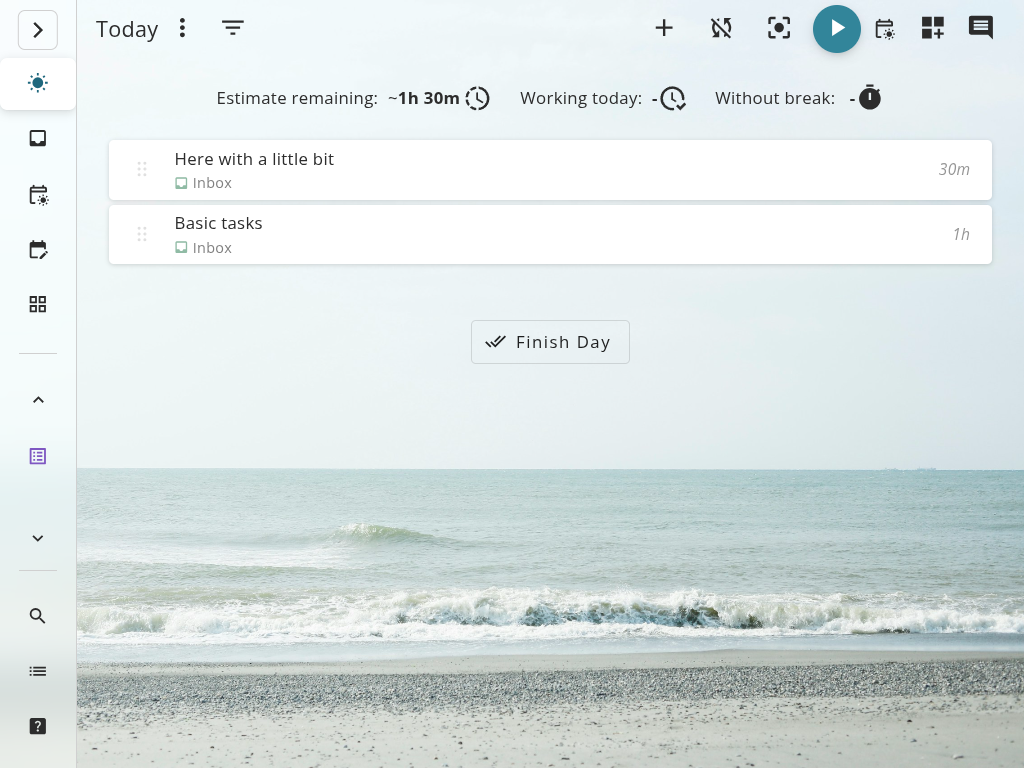
Super Productivity planning view showing tasks, schedule, and integrated timer.

When to switch

Signals Super Productivity is the better fit

If you recognize yourself in any of these scenarios, the in-depth guides below show exactly how your workflow changes when you switch.

  • You ship code or client work

    GitHub, GitLab, and Jira integrations auto-link time to issues. Exports make billing transparent without spreadsheets.

  • You need offline-first focus

    Super Productivity caches tasks, timers, and notes locally, so your workflow keeps running without an internet connection.

  • You care about privacy

    MIT licensed, zero telemetry, and bring-your-own or self-hosted sync options mean we never treat your backlog as ad inventory–and you stay in control of where it lives.

  • You prefer flow over streaks

    Timeboxing, gentle reminders, and daily planning canvases reduce context switching without guilt-driven gamification.

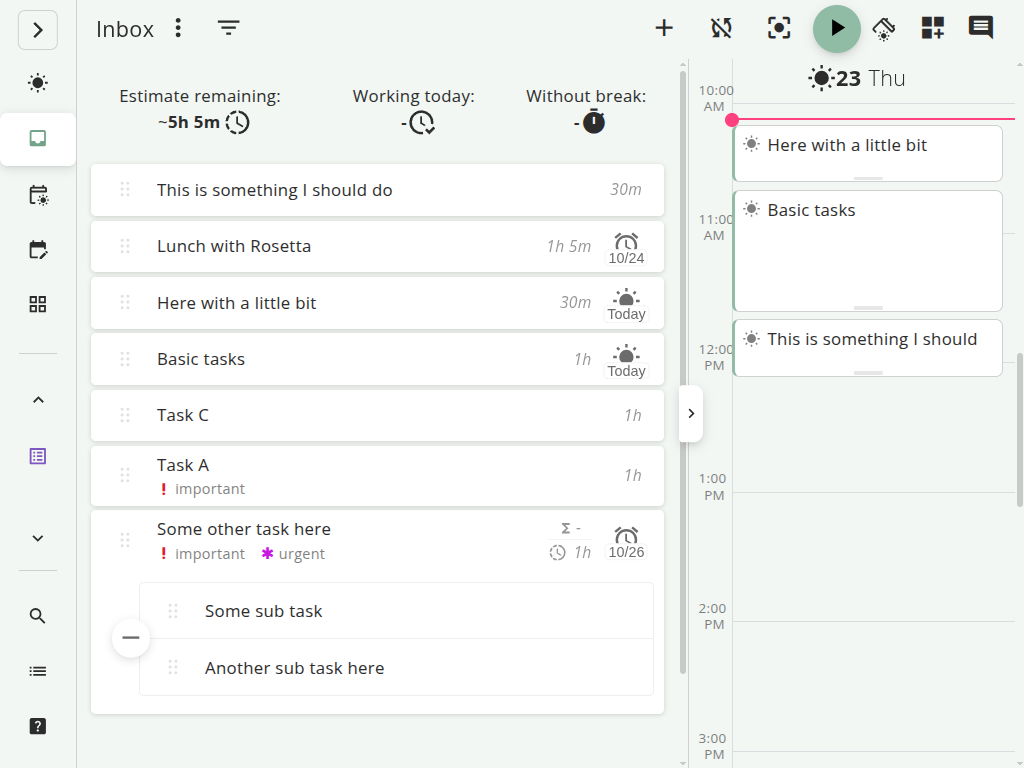
Super Productivity day planner with timeboxed tasks and Pomodoro timer.

Live guides

Start with these head-to-heads

Each write-up includes decision criteria, migration tips, and quick-start templates tailored to that tool.

New guide

Todoist vs Super Productivity

See how Super Productivity compares as a Todoist alternative: local-first planning, integrated time tracking, and Jira/GitHub sync in one window.

Developers and people with ADHD who outgrow list-only planning.

New guide

TickTick vs Super Productivity

Compare TickTick's gamified streaks to a calmer, offline-friendly system with privacy controls and Pomodoro built in.

People who need flexible structure without mandatory cloud sync.

New guide

Notion vs Super Productivity

Compare Notion's docs and databases with Super Productivity's focused task execution and built-in time tracking.

Developers who want execution focus, not another wiki.

New guide

Super Productivity vs Toggl Track

Compare cloud-only time tracking to a private, integrated developer workstation that tracks time as you code.

Developers who want Jira/GitHub sync without monthly fees or telemetry.

New guide

Super Productivity vs Clockify

Compare the popular team timesheet tool to a private, developer-first workstation that keeps you in the flow.

Developers who want to track time without SaaS surveillance.

New guide

Sunsama vs Super Productivity

Compare the $20/month guided daily planner to a free, open-source workstation with the same timeboxing and focus tools plus Jira/GitHub sync.

Developers who want daily planning without a subscription.

New guide

Things 3 vs Super Productivity

Compare the polished Apple-only task manager to a cross-platform alternative with built-in time tracking and developer integrations.

Users who need Windows, Linux, or Android support alongside time tracking.

New guide

Reclaim.ai vs Super Productivity

Compare AI auto-scheduling to deliberate manual timeboxing with built-in task management, time tracking, and offline support.

Developers who prefer manual control over their schedule.

New guide

Obsidian Tasks vs Super Productivity

Compare a note-taking tool with task plugins to a purpose-built workstation with timers, daily planning, and Jira integration out of the box.

PKM users who need dedicated task execution alongside their notes.

New guide

Pomofocus & Forest vs Super Productivity

See why a standalone focus timer adds context switching — and how an integrated Pomodoro + task + time tracking app eliminates it.

Developers who want Pomodoro wired into their actual workflow.

FAQ

Frequently Asked Questions

Need more detail? The guides below go deep, and you can also skim the developer productivity guide or the developer workflow overview.

Is Super Productivity better than Todoist?
They solve different problems. Todoist is a fantastic shared list manager. Super Productivity focuses on deep work and brings Pomodoro, analytics, Jira/GitHub integrations, and offline autonomy into one space. If you want more focus and ownership, the switch pays off quickly.
Is Super Productivity open source?
Yes. The entire codebase is MIT licensed, so you can audit, contribute, or self-host sync services. There is no telemetry, hidden tracking, or forced account creation.
Can Super Productivity replace time trackers like Toggl Track or Clockify?
For most freelancers and small teams, yes. You get built-in timers, automatic task linking, Jira/GitHub context, exports, and Pomodoro without juggling extra SaaS apps. Large agencies that need approvals or payroll hooks may still prefer a dedicated tracker.
Which productivity app is best for developers?
Developers usually need backlog ownership, integrations with code tools, and minimal context switching. Super Productivity was built for that exact workflow, but the right choice still depends on whether you prioritize privacy (choose SP) or enterprise collaboration dashboards (choose a SaaS list manager).

Ready to see the difference?

Download Super Productivity for desktop or open the web app to start tracking in minutes. Free, open source, and privacy-first.