

· Johannes Millan · 5 min read
Super Productivity vs. Things 3: Developer Comparison
Things 3 by Cultured Code is one of the most beautifully designed task managers ever made. Its keyboard-driven UI, thoughtful scheduling model, and distraction-free aesthetic have earned it a devoted following – especially among Apple users.
But Things 3 is Apple-only, has no time tracking, and can’t connect to your issue tracker. If you need any of those, Super Productivity fills the gaps.
TL;DR: Which one should you choose?
Things 3: Best for Apple-ecosystem users who want a fast, beautiful personal task manager and don’t need time tracking or developer integrations.
Super Productivity: Best for developers on any platform who need built-in timers, Jira/GitHub sync, API/plugin extensibility, and privacy-first data storage.
Privacy & open-source verdict
Who owns your data?
| Criterion | Super Productivity | Things 3 |
|---|---|---|
| Open source | Yes – MIT license | No – proprietary |
| Local-first storage | Yes – data on your device | Local with Things Cloud sync |
| Telemetry | None | Minimal (crash reports) |
| User-managed E2EE | BYO encryption via sync provider | Things Cloud uses encryption; not user-managed E2EE |
| Self-hosted / BYO sync | Yes – WebDAV, Dropbox, or local file | No – Things Cloud only (proprietary) |
Verify yourself: source code · privacy policy · code signing
⏱️ The Contenders
Things 3: The Design-First Task Manager
Things 3 is a premium, one-time-purchase task manager exclusive to Apple platforms. It organizes work through Areas, Projects, and a Today/Upcoming scheduling model. Its keyboard navigation and drag-and-drop interactions set the standard for how a task app should feel.
- Best for: Apple users who want a fast, elegant personal task manager with no clutter.
- Core Philosophy: Simplicity, speed, and design excellence for individual task management.
- Pricing: One-time purchase – $49.99 (Mac), $19.99 (iPad), $9.99 (iPhone). ~$80 for the full suite.
Super Productivity: The Developer’s Workstation
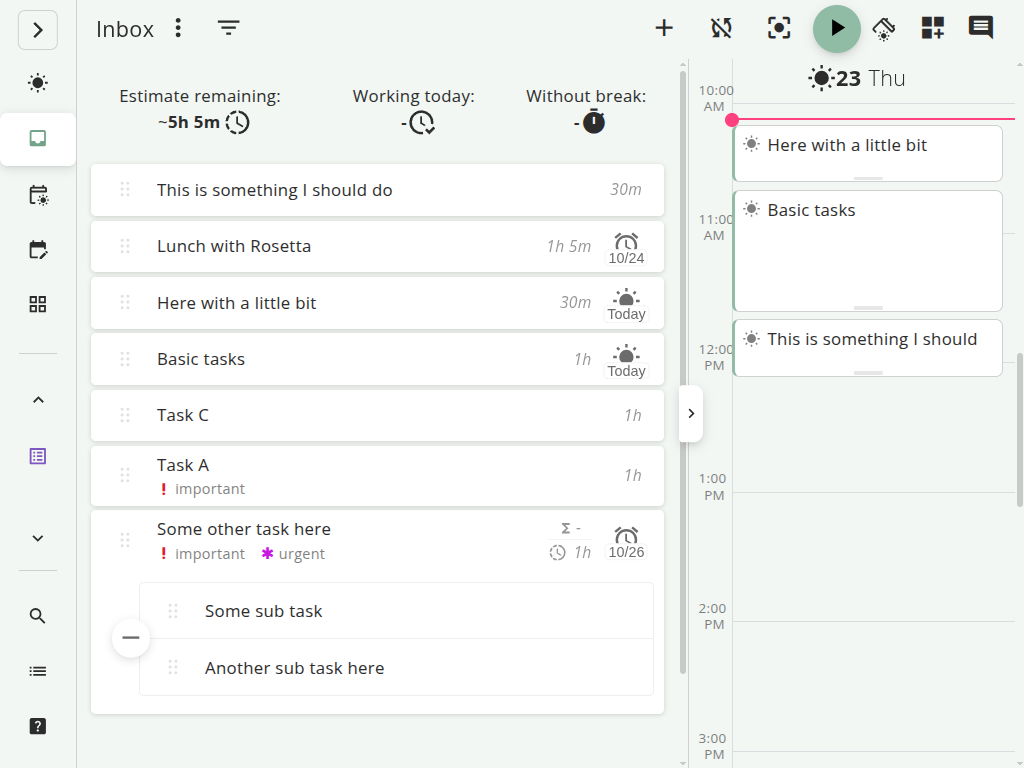
Super Productivity is an open-source (MIT licensed), local-first productivity suite that runs on every platform. It combines task management with time tracking, Pomodoro, daily planning, developer integrations, and a REST API and plugin system that includes automations and MCP plugins.
- Best for: Developers, freelancers, and power users who want tasks + time in one place.
- Core Philosophy: Privacy-first, offline-first, and integrated into the developer’s issue workflow.
- Pricing: Free and open source. Forever.
⚔️ Feature Comparison
| Feature | Things 3 | Super Productivity |
|---|---|---|
| Task Organization | Areas → Projects → Tasks → Checklists | Projects → Tasks → Subtasks with tags and priorities |
| Scheduling | Today, This Evening, Upcoming, Someday | Daily planner with estimates and schedule view |
| Time Tracking | None | Built-in timers, idle detection, per-task analytics |
| Pomodoro | None | Built-in with configurable intervals |
| Issue Integrations | None | Jira, GitHub, GitLab, Gitea, OpenProject |
| Extensibility | URL scheme and Apple Shortcuts | REST API, plugin system, automations plugin, MCP plugins |
| Calendar Integration | View-only calendar overlay | CalDAV, Google Calendar integration |
| Offline Mode | Yes (local-first with Things Cloud sync) | Yes (local-first with optional sync) |
| Platform Support | macOS, iOS, iPadOS, Apple Watch, Vision Pro | Linux, macOS, Windows, Android, iOS, Web |
| Data Export | SQLite database export; URL scheme for import | JSON (fully portable, human-readable) |
| Open Source | No (proprietary) | Yes (MIT license) |
| Pricing | ~$80 one-time (full Apple suite) | Free |
🔍 Deep Dive: Where They Differ
1. Platform Availability
This is the most obvious dividing line. Things 3 is Apple-only – no Windows, no Linux, no Android, no web app. If you use a Mac at home and Linux at work, Things 3 can’t follow you.
Super Productivity runs everywhere: Linux, macOS, Windows, Android, iOS, and in any browser. Your workflow doesn’t break when you switch devices or operating systems.
2. Time Tracking
Things 3 has zero time tracking capability. You can check off tasks, but you’ll never know how long anything took. If you need to track billable hours, estimate future work, or review where your time went, you need a separate tool like Toggl Track.
Super Productivity has time tracking built in. Start a timer on any task, get idle detection when you step away, and review per-project analytics at the end of the week. For freelancers billing by the hour or developers logging time to Jira, this is the difference between one tool and two.
3. Developer Workflow
Things 3 has no integrations with issue trackers. There’s no API for pulling GitHub issues, no Jira sync, and no way to connect your coding workflow to your task list. It’s purely a personal organizer.
Super Productivity integrates directly with Jira, GitHub, GitLab, Gitea, and OpenProject. Your tickets appear as tasks, time gets logged back to the issue automatically, and you can transition issue status without opening a browser. For workflows Things 3 cannot model, Super Productivity also provides a REST API and plugin system, including automations and MCP plugins.
4. Design and User Experience
This is where Things 3 genuinely excels. Its interface is fast, minimal, and delightful to use. Keyboard shortcuts feel natural, drag-and-drop is fluid, and the app never gets in your way. Cultured Code has refined this experience over many years, and it shows.
Super Productivity prioritizes function density – you get more features in one view, but the learning curve is steeper. It’s a workstation, not a zen garden. Once configured, it’s efficient, but it won’t match Things 3’s polish on first launch.
5. Data and Privacy
Both tools are local-first, which is relatively rare. Things 3 stores data locally and syncs via Things Cloud (proprietary, encrypted, free). Super Productivity stores data locally and offers sync via Dropbox, WebDAV/Nextcloud, Super Sync, or local file sync – your choice.
The key difference: Super Productivity is open source. You can audit the code, verify there’s no telemetry, and export your data in plain JSON at any time. Things 3 is proprietary.
⚖️ Where Things 3 Wins
- Design quality: The interface is simply more polished. Animations, keyboard shortcuts, and spatial navigation feel best-in-class on Apple hardware.
- Speed: Things 3 is blazingly fast. Task creation, search, and navigation are near-instant.
- Simplicity: If you just want a task list without timers, integrations, or analytics, Things 3’s lack of features is a feature. Less to configure, less to distract.
- Apple ecosystem: Siri integration, Apple Watch complications, and Shortcuts support make it deeply embedded in Apple’s platform.
🏆 The Verdict
Choose Things 3 if:
- You’re all-in on Apple and don’t use Windows, Linux, or Android.
- You want a beautiful, fast personal task manager and nothing more.
- You don’t need time tracking, developer integrations, or Pomodoro timers.
Choose Super Productivity if:
- You work on multiple platforms or use Linux/Windows.
- You need time tracking built into your task manager.
- You work with Jira, GitHub, or GitLab and want bidirectional sync.
- You want REST API, plugin, automation, or MCP extension points instead of Apple-only automation surfaces.
- You prefer open source and want to own your data without proprietary cloud services.
🚀 Ready to try the cross-platform alternative?
Super Productivity works on every platform Things 3 doesn’t – and adds time tracking, developer integrations, API access, and plugins to the mix.
- Download Super Productivity for Linux, macOS, or Windows.
- Explore the Developer Productivity Guide to set up your first project.
- Compare more tools in our Comparison Hub.
Related resources
Keep exploring the topic
Developer Productivity Hub
Templates, focus rituals, and automation ideas for shipping features without burning out.
Read moreTodoist vs TickTick vs Super Productivity for Developers
Todoist vs TickTick vs Super Productivity, compared through a developer lens: Git integrations, time tracking, privacy, offline use, and which task manager actually fits a coding workflow.
Read more7 Best To-Do Apps for Developers (2026 Comparison)
A practical comparison of Super Productivity, Obsidian, Taskwarrior, Linear, Todoist, Trello, and other developer-focused to-do apps with issue integrations, APIs, and workflows that matter.
Read moreStay in flow with Super Productivity
Plan deep work sessions, track time effortlessly, and manage every issue with the open-source task manager built for focus. Concerned about data ownership? Read about our privacy-first approach.

About the Author
Johannes is the creator of Super Productivity. As a developer himself, he built the tool he needed to manage complex projects and maintain flow state. He writes about productivity, open source, and developer wellbeing.