


Why Timeboxing Works: The Productivity Science Explained
Discover the scientific research behind timeboxing and learn how to implement this powerful productivity technique using Super Productivity's intuitive short syntax.
Time Boxing Made Simple
Transform your to-do list into a visual timeline. Plan realistic schedules, stay focused on what matters, and actually stick to your commitments – all with an offline-first daily planner and time boxing app built for professionals. It’s a stop-guessing, start-finishing approach that helps you truly master time boxing without the busywork.
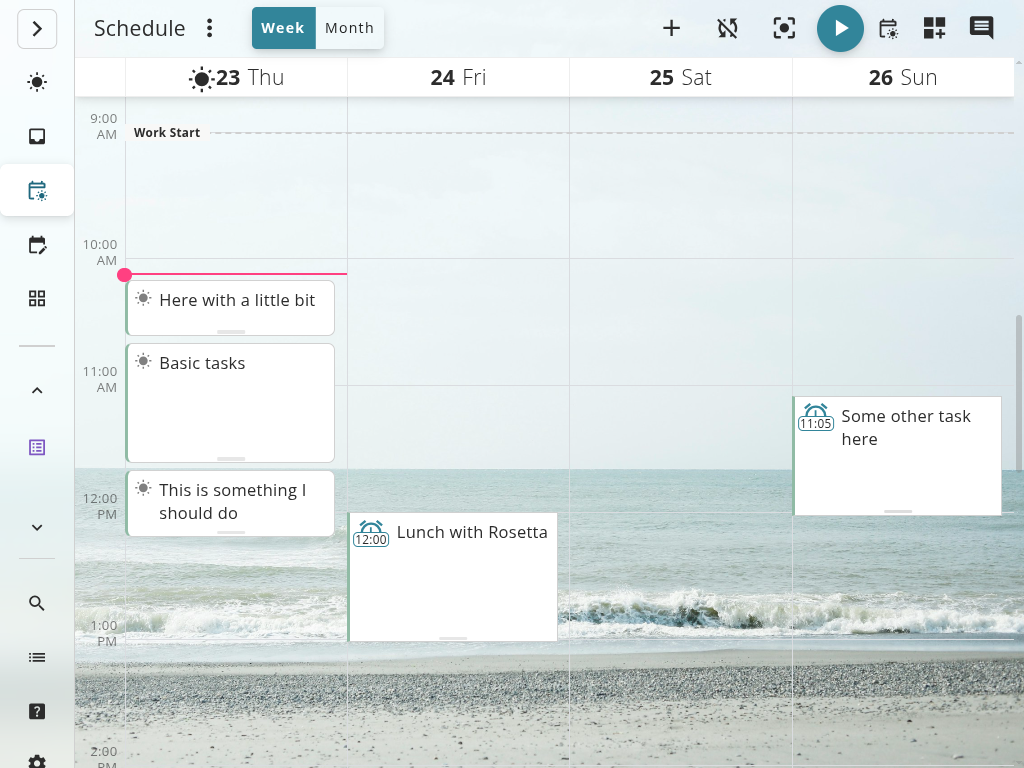
Time Boxing With the App
This is the product playbook: plan with the schedule view, focus with timers, and improve with real time-tracking data. Need the research? Read the time boxing method guide.
Drag tasks into the schedule and assign realistic boxes. See your capacity for the day before you start so you avoid overcommitting.
Start a focus timer for each box. The app tracks actuals vs. estimates automatically, so you build time-awareness without spreadsheets.
Reality changed? Drag boxes to reschedule, keep your totals visible, and carry learnings into tomorrow. Missed boxes become data, not guilt.
Use this page to see how the time boxing app workflow works – features, timers, scheduling, and exports. Use the method guide for the science, history, and frameworks behind time boxing.
Work With Reality
No more guessing how long tasks will take. Build self-awareness through visual feedback and historical tracking.
Time boxing isn't about perfect planning - it's about building awareness of how you actually spend time. Super Productivity makes it visible, trackable, and adjustable in real-time.
Visual Time Allocation
See your entire day mapped out with time-boxed tasks. Instantly spot scheduling conflicts and overcommitments.
Realistic Estimates
Track estimated vs. actual time for every task. Learn your patterns and improve planning accuracy over time.
Flexible Scheduling
Drag and drop tasks to reschedule. Adjust time boxes on the fly when reality hits. No rigid constraints.
Focus Protection
Active timers keep you accountable to your time box. Gentle alerts when time is running out.
Everything you need to estimate, execute, and improve your time management
Smart Time Estimates
Set time estimates with a single click. Historical data helps you calibrate future estimates.
Pomodoro Integration
Break time boxes into focused Pomodoro sessions with automatic break reminders for deep work.
Day and Week Views
Visualize your time boxes across multiple time horizons. Plan realistically within available hours.
Time Tracking
Automatic time tracking for every task. Know exactly where your time goes without manual logging.
Overload Warnings
Visual indicators show when you've scheduled more work than hours available in the day.
Task Breakdown
Split large time boxes into smaller subtasks. Make progress trackable and less overwhelming.
Success Stories
" Time boxing in Super Productivity changed how I work. Seeing my entire day laid out visually helps me say no to overcommitments before they happen. My estimates are finally realistic. "
Sarah Chen
Product Manager
" As a developer with ADHD, the visual timeline and focus mode are game-changers. I can actually stick to time boxes instead of disappearing down rabbit holes for hours. "
Marcus Rodriguez
Software Engineer
" I tried calendar blocking for years and it never stuck. Super Productivity's flexible time boxing lets me adjust on the fly when client calls run over, without losing sight of my total time invested. "
Emma Thompson
Freelance Consultant
Stay Focused
Visual feedback and focus modes keep you on track during execution.
The gap between planning and doing is where most productivity systems fail. Super Productivity bridges that gap with constant visual feedback that keeps you honest and focused.
Active Task Timer
Always-visible timer shows remaining time in your current time box. Stay aware without checking the clock.
Focus Mode
Hide distractions and show only your active task. Full-screen timer keeps you locked in.
Progress Tracking
See completion percentage and time spent update in real-time as you work through your time box.
FAQs
Clear answers about how time boxing works in Super Productivity.
Time boxing is allocating a fixed time period to each task before you start. Instead of working until done, you commit to working for a specific duration. This creates urgency, prevents perfectionism, and makes scheduling realistic.
Time tracking measures how long tasks actually take. Time boxing sets upfront limits on how long you'll spend. Super Productivity does both - you set time boxes for planning, and the app tracks actual time for learning and billing.
You get a gentle notification when time runs out, but you can continue working or reschedule remaining work. The goal is awareness, not rigid enforcement.
Yes. Time boxing and Pomodoro are separate features. Use them together for structured deep work, or use time boxing alone for flexible scheduling.
Absolutely. Time boxing prevents creative work from expanding endlessly. Set realistic time boxes, work with full focus during the box, then step back and evaluate. Many creatives find constraints boost creativity.
Super Productivity tracks estimated vs. actual time for every task. Review this data weekly to spot patterns - like consistently underestimating certain task types. Your estimates will naturally improve with feedback.
Build better time awareness with visual planning and tracking. Free forever. Open source. Your data stays local.
Discover the scientific research behind timeboxing and learn how to implement this powerful productivity technique using Super Productivity's intuitive short syntax.

Learn the science and systems behind deep work – how to train focus, reduce distractions, and create meaningful, high-impact output in the modern attention economy.
Context switching can cost you 40% of your productive time. Learn three research-backed strategies to batch work by cognitive mode, protect your schedule, and engineer an environment that minimizes interruptions.
Learn how to apply David Allen’s GTD method inside Super Productivity – the open-source, privacy-friendly app built for focus and clarity.