

· Johannes Millan · 5 min read
How to Build an Eisenhower Matrix in Super Productivity
The Eisenhower Matrix sorts every task by two questions: is it urgent, and is it important? Those two axes create four quadrants: do it now, schedule it, delegate it, or delete it. The method is simple, but a common failure mode is keeping the matrix separate from the task list where the work actually happens.
This guide fixes that. You’ll use the Eisenhower Matrix board inside Super Productivity, so the quadrants hold your actual tasks – complete with scheduling and time tracking – instead of a snapshot you redraw every week.
For the full strategy behind the framework and how each quadrant maps to engineering work, start with our Eisenhower Matrix guide for developers. This article is the hands-on companion: it focuses on the setup and the daily routine. If prioritization itself is the hard part, The Prioritising Scheme covers a simple way to use Super Productivity’s ordered Today list for manual prioritization.
1. The Four Quadrants, at a Glance
The urgent-versus-important split behind the matrix is usually traced to a 1954 speech by Dwight D. Eisenhower and was popularized decades later by Stephen Covey.1 Here’s the short version. Super Productivity’s default board labels the panels by urgency and importance; the familiar action labels are what each panel means in practice:
| Default panel | Common examples | Action |
|---|---|---|
| Urgent & Important | Production outage, failing deploy | Do now |
| Not Urgent & Important | Deep features, tests, refactoring | Schedule |
| Urgent & Not Important | Status meetings, low-value pings | Delegate / defer |
| Not Urgent & Not Important | Busywork, idle notifications | Delete |
The one idea worth keeping front of mind: for many developers, Q2 is where the highest-leverage work lives, and it is easy to sacrifice when urgent work appears. Nothing forces you to refactor that fragile module today, so it waits – until it becomes a Q1 fire. The rest of this guide is about protecting it on a real board.
2. Build the Board
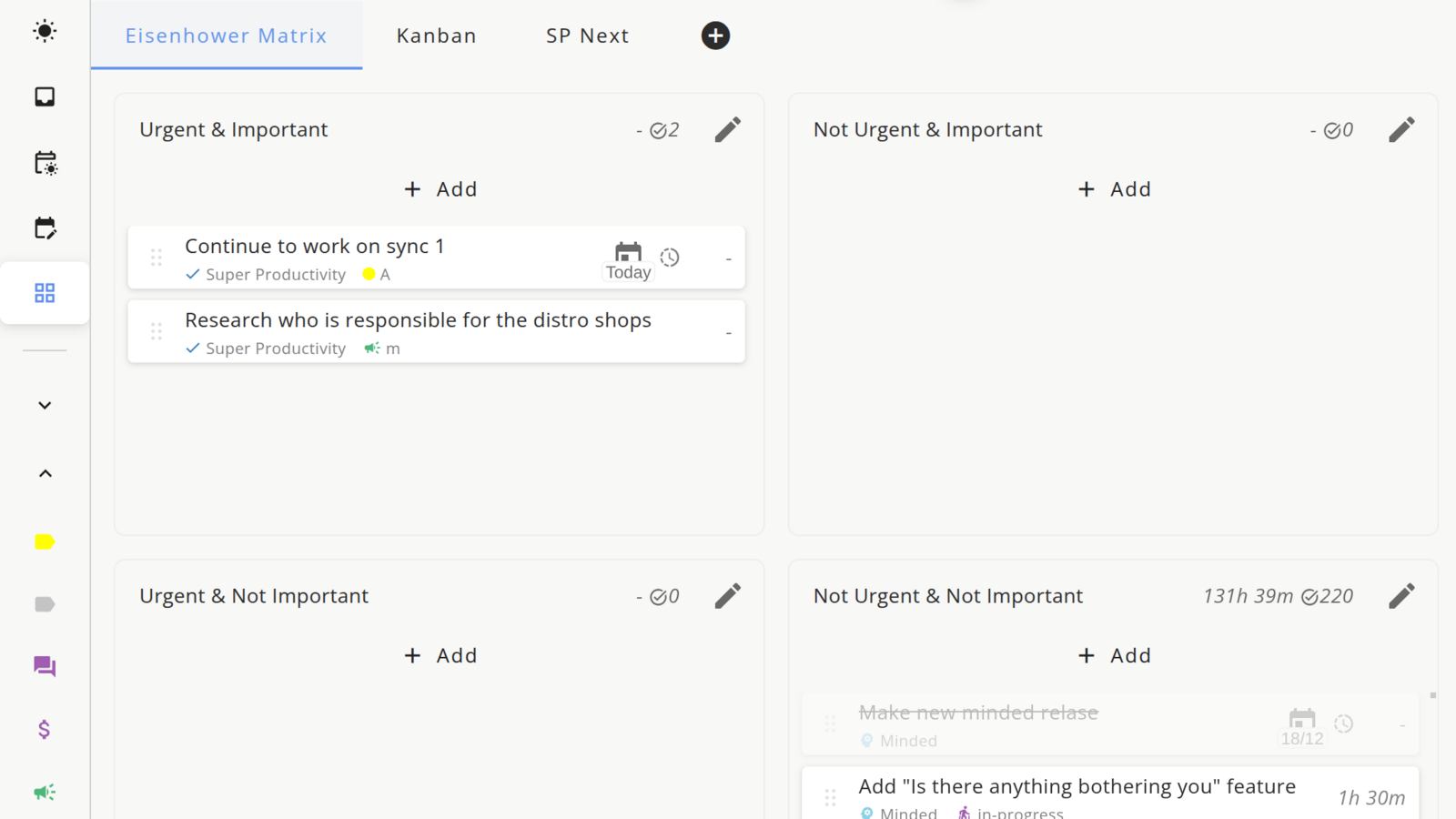
Super Productivity includes an Eisenhower Matrix board preset under Boards. It is a customizable board, not a separate planning module. The default panels are Urgent & Important, Not Urgent & Important, Urgent & Not Important, and Not Urgent & Not Important.
- Open Boards and select the Eisenhower Matrix board. If you removed the preset, recreate a board that filters by the built-in urgent and important markers.
- Sort your tasks. Existing tasks appear according to the board filters. Add new tasks directly in a panel, or drag tasks between panels to update the urgency/importance markers.
- Place each task by asking two questions only: Is it urgent? Is it important? Classify quickly, then revisit edge cases during review.
Pro tip: If the built-in urgent/important markers are too subtle for your daily list, add optional
Q1,Q2,Q3, andQ4tags and give them distinct colors. Treat those tags as your own labeling layer, not the default board logic.
Keep the quadrants honest
The matrix only works if Q1 stays small. If half your tasks land in “Do now,” you’re using urgency as a default, not a judgment. Before a task goes into Q1, ask: what actually breaks if this waits until tomorrow? If nothing breaks and the task is still important, it usually belongs in Q2. If it is urgent but not important, it belongs in Q3. If it is neither urgent nor important, it belongs in Q4.
3. Turn Quadrants Into a Daily Plan
A sorted board is a plan, not a result. The next step is moving the right tasks into your day.
- Schedule Q2 first. Block time for your most important non-urgent task before the urgent stuff lands. Drag it into today’s list and give it a time estimate. For the mechanics, see our Timeboxing & Scheduling guide – or Timeboxing vs Time Blocking if you’re unsure which fits Q2.
- Handle Q1 as it appears, but log it. Every Q1 task is worth a quick note on why it became urgent – that can help you spot Q2 work you skipped.
- Batch Q3. Group genuinely similar urgent-but-unimportant items into one slot instead of letting them interrupt deep work all day. Decision Fatigue for Developers explains why batching similar decisions can reduce switching.
- Delete Q4 without guilt. A task you’ll never do isn’t really a task. Remove it.
4. Use Time Tracking to Audit Yourself
This is where building the matrix inside your task manager pays off. Because every task can carry Super Productivity’s built-in timer, your review can use real task data instead of memory.
Super Productivity does not create a separate automatic “time by Eisenhower quadrant” dashboard. To audit the matrix, use tags or keep the board sorted during the week, then review the worklog or exported time data and manually total where the time went. If you move tasks between quadrants later, treat the result as a review aid rather than a perfect historical report:
- Mostly Q1 and Q3? Your week may have been dominated by reactive work. Check whether preventable Q2 work was skipped.
- A healthy chunk in Q2? You protected the work that compounds.
That weekly check turns the Eisenhower Matrix from a one-time sorting exercise into a feedback loop. Pair it with a recurring review – the same habit that powers a reliable task estimation system – and your quadrant choices can get more accurate over time.
Next Moves
The matrix is only useful when it touches your real work. Two steps to start today:
- Open the board now. Four panels, ten minutes. Sort whatever is already on your plate.
- Schedule one Q2 task for tomorrow before anything urgent has a chance to claim the time.
To go deeper on mapping engineering work to each quadrant and avoiding the common traps, read the full Eisenhower Matrix guide for developers.
Footnotes
The urgent/important distinction is commonly attributed to a 1954 address by President Dwight D. Eisenhower, who quoted an unnamed university president, and was later popularized by Stephen R. Covey in The 7 Habits of Highly Effective People (1989). ↩
Frequently Asked Questions
Does Super Productivity have a built-in Eisenhower Matrix?
Yes. Super Productivity includes an Eisenhower Matrix board preset under Boards. It is not a separate standalone module; it is a customizable board that uses your real tasks and the built-in urgent/important markers, so scheduling, estimates, notes, and time tracking still work.
How do I add color or tags to each Eisenhower quadrant?
The default board uses urgent and important markers to place tasks in the four panels. If you want more visible labels in your daily list, you can add optional Q1, Q2, Q3, and Q4 tags and color them, but that is a custom workflow rather than the default board setup.
Which quadrant should I spend the most time in?
For many developers, Quadrant 2: important but not urgent. This is where deep features, test coverage, refactoring, and learning often live. Q2 work has no deadline screaming at you, so it is easy to postpone until it becomes a Q1 emergency. Deliberately scheduling Q2 time is what makes the method pay off.
What do I do with a task that feels both urgent and important?
That is usually a Quadrant 1 task – do it now. The trap is that almost everything feels urgent in the moment. As a heuristic, ask what actually breaks if it waits until tomorrow. If nothing breaks and the task is still important, it usually belongs in Q2. If it is urgent but not important, treat it as Q3; if it is neither urgent nor important, it belongs in Q4.
Can I see how much time I spend in each quadrant?
Super Productivity does not currently show a dedicated automatic Eisenhower-quadrant report. You can review task time, tags, and exported worklog data manually, but remember that a task's current quadrant may not preserve its historical quadrant if you move it later.
Related resources
Keep exploring the topic
Timeboxing & Scheduling Guide
Blend buffer blocks, timeboxing, and daily reviews so your calendar and task list stay in sync.
Read moreDeveloper Productivity Hub
Templates, focus rituals, and automation ideas for shipping features without burning out.
Read moreCalendar Blocking vs. To-Do Lists: The Hybrid That Works
Pure calendar blocking is fragile. Pure to-do lists ignore time. Here's how combining both approaches fixes the flaws of each – and why timeboxing is the bridge.
Read moreStay in flow with Super Productivity
Plan deep work sessions, track time effortlessly, and manage every issue with the open-source task manager built for focus. Concerned about data ownership? Read about our privacy-first approach.

About the Author
Johannes is the creator of Super Productivity. As a developer himself, he built the tool he needed to manage complex projects and maintain flow state. He writes about productivity, open source, and developer wellbeing.