

· Johannes Millan · 6 min read
Personal Kanban for Developers: A Practical Setup
Personal Kanban for developers is a simple visual system for answering three questions: what could I work on, what am I working on now, and what is blocked or waiting? The point is not to recreate Jira for one person. The point is to protect attention.
Most developers already have too many boards: Jira sprint boards, GitHub project boards, GitLab issues, Linear views, Trello boards, and maybe a personal to-do list. A personal Kanban board should be smaller than all of them. It should show the work that competes for your focus today. For the wider workflow around focus, issue trackers, and deep work, see the Developer Productivity Guide.
Why personal Kanban works for developers
Software work is full of invisible work in progress.
You start a bug, pause to review a PR, answer a question in chat, check CI, return to the bug, notice a failing test, then open a second issue. By lunch, you feel busy but cannot explain the shape of the day.
Personal Kanban helps because it makes work states visible:
- Backlog: possible work, not a commitment.
- Ready: work you can start without more thinking.
- Doing: your current attention.
- Waiting: blocked by a person, build, review, or decision.
- Review: work done by you but not yet merged, shipped, or closed.
- Done: completed work, useful for shutdown and weekly review.
That visual separation matters. A flat list says everything is equally available. A board says, “This is active, this is blocked, this can wait.”
The minimum developer board
Start with six columns:
| Column | Purpose | Example card |
|---|---|---|
| Backlog | Ideas and future work | ”Try replacing date parser” |
| Ready | Clear tasks that can be started | ”Fix empty-state layout on mobile” |
| Doing | Current active task | ”Debug sync retry loop” |
| Waiting | Blocked or delegated work | ”Await API answer from billing team” |
| Review | PRs, docs, or changes needing feedback | ”PR #1842: add import validation” |
| Done | Finished work | ”Ship settings copy fix” |
This is enough for most individual developers.
Avoid starting with columns like “Analysis”, “Design”, “Implementation”, “Testing”, “QA”, and “Deploy” unless each column changes what you do next. If your personal board looks like an enterprise process map, you will stop using it.
Add WIP limits before you add features
The power of Kanban is not dragging cards. It is limiting work in progress.
Use these personal WIP limits:
- Doing: 1 card
- Waiting: 3 cards
- Review: 3 cards
- Ready: 5 cards
The limits are intentionally small. If “Doing” has four cards, you are not doing four things. You are switching between four unresolved contexts. That means your board is telling the truth, but your workflow is leaking focus.
When a column hits its limit, stop pulling new work. Clear or renegotiate existing work first.
Examples:
- Doing is full? Finish, pause, or explicitly move the task to Waiting.
- Waiting is full? Follow up, close stale blockers, or decide what no longer matters.
- Review is full? Review or ask for review before starting more code.
- Ready is full? Stop grooming the backlog and start executing.
Turn issue trackers into inputs, not masters
Your team issue tracker is a source of truth for shared work. Your personal Kanban board is a source of truth for your attention.
Do not mirror every assigned ticket. Pull only the items that need personal action.
Good personal cards:
- “Investigate flaky sync test”
- “Review Nora’s PR about calendar auth”
- “Write migration notes for release”
- “Follow up on API rate limit question”
Bad personal cards:
- “Sprint 42”
- “Backend epic”
- “Refactor project”
- “Work on Jira”
Each card should represent a next action or a small cluster of actions, not a whole project.
If you use Super Productivity, connect Jira, GitHub, or GitLab and pull issues into your local task list. Then use your personal board to decide what is actually active today. That keeps the team tool intact while giving you a private execution layer.
How to size cards
A personal Kanban card should usually fit inside one focused session.
Use this sizing rule:
- 15 minutes: admin, small review, quick reproduction
- 25 minutes: focused bug investigation or small implementation
- 45 minutes: deeper coding, writing, or review
- 90 minutes: only for genuinely complex work with a checkpoint
If a card is larger than 90 minutes, split it.
Instead of:
- “Implement calendar integration”
Use:
- “List calendar auth requirements”
- “Create OAuth setup task”
- “Render events in planner view”
- “Handle expired token state”
- “Write docs for calendar permissions”
Small cards reduce task paralysis because the next move is visible.
A developer-specific weekly rhythm
Use the board in three lightweight loops.
Morning planning
Spend five minutes:
- Move at most five cards into Ready.
- Pick one Doing card.
- Add time estimates.
- Hide the rest.
This prevents backlog browsing from becoming the first procrastination loop of the day.
During work
Move cards only when state changes:
- Ready to Doing when you start.
- Doing to Waiting when blocked.
- Doing to Review when the PR is open.
- Review to Done when merged, accepted, or closed.
Do not use the board as a diary. Use it as a control surface.
Shutdown
Spend five minutes:
- Move finished work to Done.
- Add a short note to any Waiting card.
- Pick the likely first card for tomorrow.
- Clear stale Ready cards.
Shutdown is where the board pays off. Tomorrow starts with less reloading.
Common mistakes
Too many columns
Every extra column asks you to maintain a distinction. If that distinction does not affect behavior, remove it.
No WIP limit
Without limits, Kanban becomes a prettier task list. The board should make overcommitment obvious.
Giant cards
If a card can sit in Doing for a week, it is too large. Split by next action, risk, or deliverable.
Treating blocked work as active
Blocked work belongs in Waiting. Leaving it in Doing keeps your attention attached to something you cannot currently move.
Mirroring the team board
Your personal board should be smaller, more tactical, and more honest about your focus than the team board.
Super Productivity setup
In Super Productivity:
- Create projects for major work streams, clients, or side projects.
- Connect issue providers if your work starts in Jira, GitHub, or GitLab.
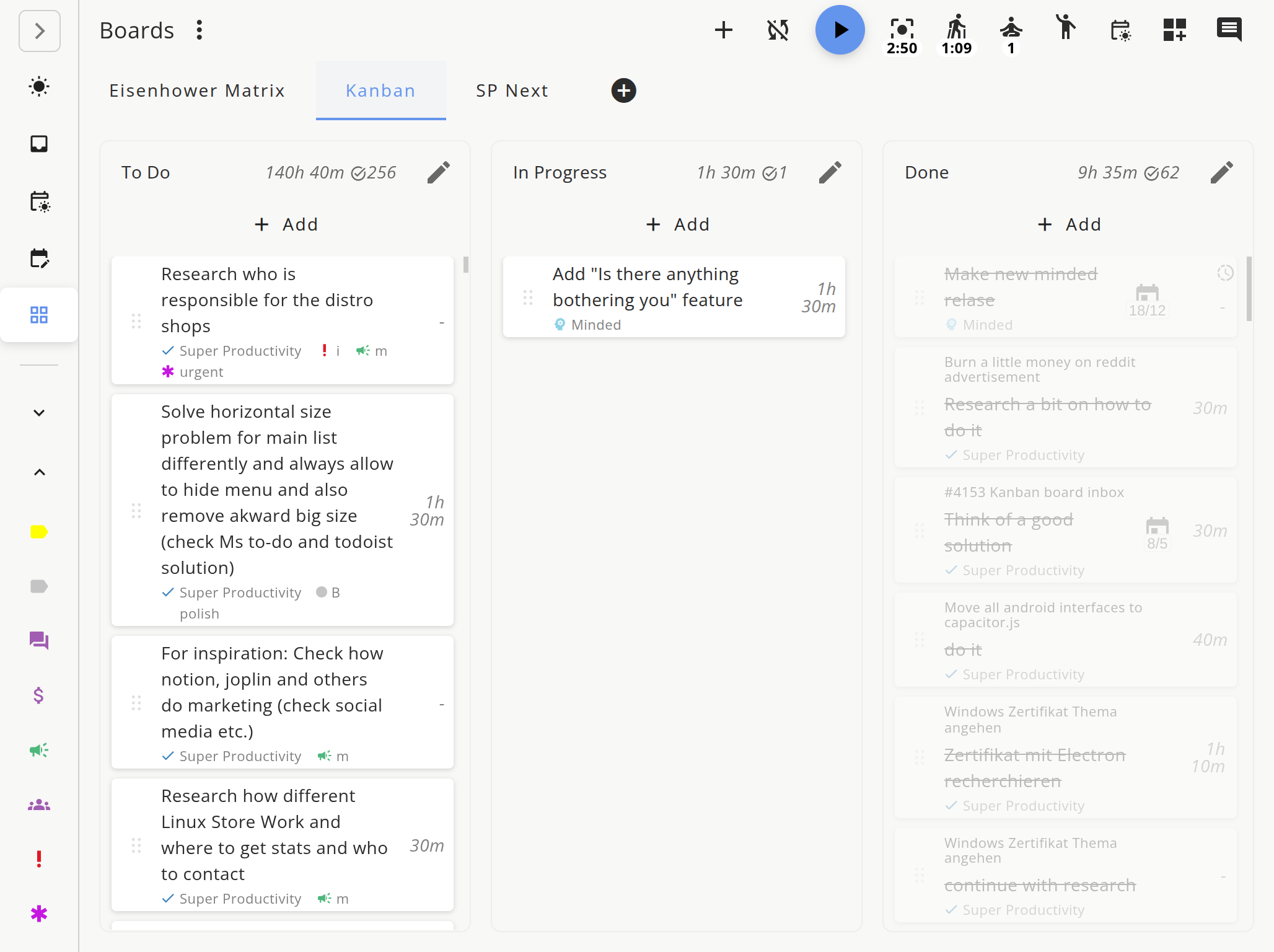
- Use the board view for your personal Kanban columns.
- Keep Today limited to the cards you realistically intend to touch.
- Add time estimates to every Ready card.
- Start time tracking when a card moves to Doing.
- Use task notes to store “where I stopped” before moving a card to Waiting.
This gives you a board, a timer, notes, and external issue context in one place. The fewer tabs you need to reopen, the easier it is to stay with the task.
Next moves
Set up the smallest possible board today:
- Create Backlog, Ready, Doing, Waiting, Review, and Done.
- Add five cards, not fifty.
- Put one card in Doing.
- Set a 25-minute timer.
- At shutdown, move cards honestly and pick tomorrow’s first card.
Personal Kanban works when it is boring enough to maintain. Keep it small, limit active work, and let the board show what your attention is actually carrying.
For the broader system around focus, context switching, and issue-tracker workflows, read the Developer Productivity Guide.
Related Resources
- Developer Productivity Guide - the larger workflow around focus and execution
- Stop Tab-Switching: Unify Jira, GitHub, GitLab Tasks - pull external issue work into one place
- Task Estimation for Developers - size cards so your board stays realistic
Frequently Asked Questions
Is Kanban useful for solo developers?
Yes. Personal Kanban is useful for solo developers because it makes work in progress visible, limits task switching, and keeps side projects from becoming a hidden backlog.
What columns should a personal developer Kanban board use?
Start with Backlog, Ready, Doing, Waiting, Review, and Done. Remove columns that do not change decisions, and keep the board small enough to scan in one glance.
How many tasks should be in Doing?
One active coding task is ideal. Two can work if one is blocked. More than that usually means the board is tracking context switching instead of preventing it.
Should I mirror my team Jira board?
No. Your personal Kanban board should reflect your attention, not the team's delivery process. Pull only the issues you personally need to act on today or this week.
Related resources
Keep exploring the topic
Developer Productivity Hub
Templates, focus rituals, and automation ideas for shipping features without burning out.
Read moreTodoist vs TickTick vs Super Productivity for Developers
Todoist vs TickTick vs Super Productivity, compared through a developer lens: Git integrations, time tracking, privacy, offline use, and which task manager actually fits a coding workflow.
Read moreAI Code Review: What It Catches and What It Misses
AI review tools catch style issues and common bugs fast – but they also create automation complacency. Learn a two-pass review strategy that gets the best of both worlds.
Read moreStay in flow with Super Productivity
Plan deep work sessions, track time effortlessly, and manage every issue with the open-source task manager built for focus. Concerned about data ownership? Read about our privacy-first approach.

About the Author
Johannes is the creator of Super Productivity. As a developer himself, he built the tool he needed to manage complex projects and maintain flow state. He writes about productivity, open source, and developer wellbeing.