

· Johannes Millan · 10 min read
Best Sunsama Alternatives in 2026
Sunsama is a good daily planner if you want a calm morning ritual: pull tasks from other tools, estimate the day, place work on a calendar, and shut down intentionally.1 The question is whether that workflow is worth a subscription for you.
As of May 13, 2026, Sunsama’s public pricing page showed a Pro Plan at $17/month when billed yearly or $22/month when billed monthly, after a 14-day free trial. Its own pricing FAQ and billing help page still listed older $20/$25 pricing, so confirm the final number at checkout before making a budget decision.1 That can be completely reasonable if it changes how you work. It can also be too much if you mainly need timeboxing, a task list, timers, and a private local workspace.
This guide compares the best Sunsama alternatives by job to be done. If you already know you are comparing Sunsama directly with Super Productivity, start with our detailed Super Productivity vs. Sunsama comparison. If your main question is calendar planning, also read the timeboxing and scheduling guide.
Quick Picks
| Alternative | Best for | Pricing model | Main trade-off |
|---|---|---|---|
| Super Productivity | Free, open-source, local-first daily planning | Free | Less guided than Sunsama |
| Motion | AI auto-scheduling and project planning | Paid | You give the algorithm more control |
| Reclaim AI | Calendar defense, habits, and focus time | Free tier plus paid plans | Calendar-first, not a full task cockpit |
| Akiflow | Fast task inbox plus calendar planning | Paid | Premium subscription price |
| Morgen | Cross-platform calendar and AI planning | Paid | More calendar app than task manager |
| Todoist | Lightweight tasks and broad integrations | Free tier plus paid plans | No Sunsama-style planning ritual |
| TickTick | Simple tasks, calendar, and Pomodoro | Free tier plus paid plans | Not open-source or developer-focused |
What To Look For in a Sunsama Alternative
Most “Sunsama alternatives” are not interchangeable. They usually replace one part of Sunsama, not the whole thing.
Before picking a tool, decide which problem you are solving:
- Daily planning: You want one place to decide what belongs in today.
- Timeboxing: You want to put specific tasks into time slots.
- Automatic scheduling: You want the app to move tasks around your calendar.
- Task consolidation: You want to pull work from Jira, GitHub, Todoist, email, or Slack.
- Time tracking: You want a record of what actually happened.
- Privacy: You do not want your task list and work patterns to live only in a vendor cloud.
- Cost: You want a free or lower-cost replacement.
Sunsama’s core workflow is guided daily planning. If that guided ritual is the feature you value most, the closest alternatives in this list are Akiflow, Morgen, Motion, and Reclaim. If you want a free, open-source, privacy-first workflow with task timers and developer integrations, Super Productivity is the better fit.
1. Super Productivity
Best for: developers, freelancers, students, and privacy-conscious knowledge workers who want a free Sunsama alternative.
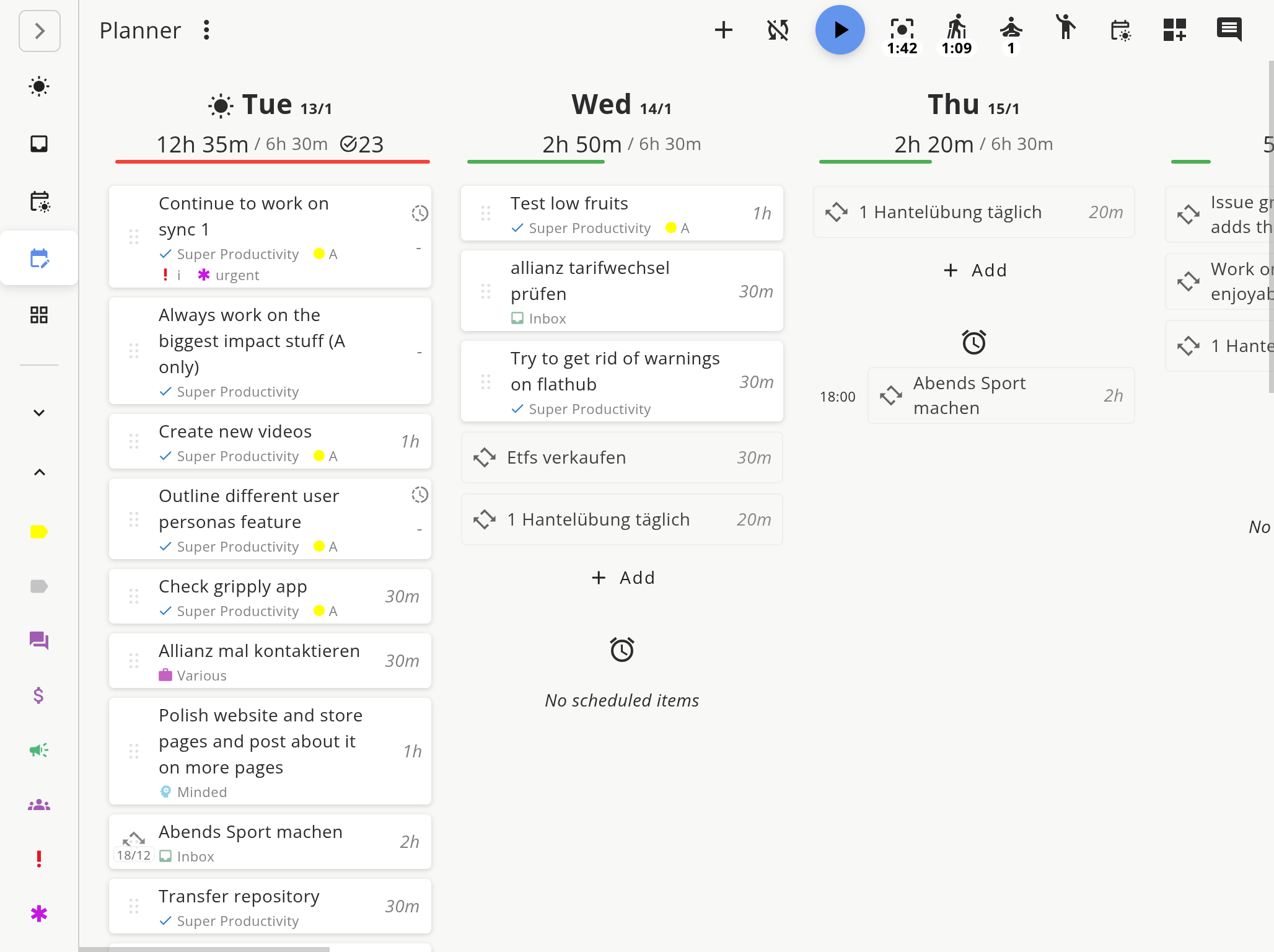
Super Productivity is an open-source task manager with daily planning, timeboxing, time tracking, Pomodoro, notes, subtasks, calendar awareness, and issue-tracker integrations. It works offline, does not require an account, and keeps your data local by default.2
Where it replaces Sunsama well:
- Plan your day from a task list instead of a blank calendar.
- Add estimates, schedule tasks, and work through the day.
- Start timers directly from tasks.
- Use Pomodoro and break reminders without another app.
- Track actual time against estimates.
- Import work from Jira, GitHub, GitLab, Gitea, OpenProject, and other issue trackers.
- Keep your data on your device unless you configure sync.
Where it differs:
- Sunsama is more guided. It walks you through a planning and shutdown ritual.
- Super Productivity is more flexible. It gives you the building blocks and gets out of the way.
- Sunsama is an account-based subscription app. Super Productivity is local-first and open source.
Choose Super Productivity if you like the idea of Sunsama but your actual needs are: “What should I work on today, how long will it take, and where did my time go?”
For a feature-by-feature breakdown, read Super Productivity vs. Sunsama.
2. Motion
Best for: people who want automatic scheduling and are comfortable letting an algorithm rebuild the day.
Motion is closer to an AI calendar and project planner than a mindful daily planning tool. Instead of asking you to manually choose and timebox every task, Motion schedules tasks around your calendar and moves them as meetings, deadlines, and priorities change.3
That makes Motion a good fit if:
- You want auto-scheduling more than a planning ritual.
- Your day changes often.
- You manage projects, deadlines, and meetings together.
- You are comfortable with a more automated workflow.
The trade-off is control. Sunsama asks you to slow down and decide what belongs in the day. Motion aims to automate that decision process. That can save time, but it can also feel opaque if you prefer manual planning.
Motion’s official pricing page listed Pro AI at $19/seat/month and Business AI at $29/seat/month with annual billing selected when checked.3
3. Reclaim AI
Best for: protecting focus time, habits, task blocks, and scheduling links inside your calendar.
Reclaim AI is a strong Sunsama alternative if your main pain is not the task list, but the calendar. It automatically blocks time for tasks, habits, buffer time, and focus work. It is especially useful if your schedule is frequently eaten by meetings.4
Choose Reclaim if:
- Google Calendar or Outlook is already the center of your workflow.
- You want focus time to appear automatically.
- You need scheduling links and meeting coordination.
- You want a free starting point.
Reclaim has a free Lite plan, and its pricing page lists paid plans starting at $10/seat/month on yearly billing or $12/seat/month monthly for Starter at the time of writing.4
The limitation: Reclaim is calendar-first. It is not a local-first manual task timer or detailed developer worklog. If you need task execution and work logs, pair it with another tool or choose Super Productivity.
4. Akiflow
Best for: power users who want a fast command center for tasks, calendar events, and integrations.
Akiflow is a premium daily planning app built around a universal inbox and calendar planning. It is more keyboard-driven than Sunsama, with a strong focus on capturing tasks from multiple tools and scheduling them quickly.5
Choose Akiflow if:
- You have tasks scattered across many apps.
- You want speed and keyboard shortcuts.
- You still want manual control over planning.
- You are okay paying for a premium workflow.
Akiflow’s official pricing page lists $34/month billed monthly or $19/month billed yearly for Pro.5
The trade-off: Akiflow is powerful, but it is not the free or local-first answer. If the reason you are leaving Sunsama is subscription fatigue or data ownership, Akiflow probably does not solve that core problem.
5. Morgen
Best for: people who want a calendar-first planner with AI planning support across platforms.
Morgen sits between manual planning and automation. It is a calendar app with task integrations, scheduling links, calendar automation, and AI-supported time blocking. Compared with Sunsama, it leans more toward calendar infrastructure.6
Choose Morgen if:
- You want one calendar across work and personal accounts.
- You care about scheduling links and calendar automation.
- You want AI suggestions but still want control.
- You need Windows, macOS, Linux, mobile, and browser support.
Morgen’s official pricing page lists individual plans at $30/month monthly or $15/month yearly.6
The trade-off: Morgen is a strong calendar planner, but if your task workflow depends on local-first storage, offline execution, or developer issue tracking, Super Productivity is a better fit.
6. Todoist
Best for: a lightweight task manager with excellent capture and broad integrations.
Todoist is not a direct Sunsama clone. It does not give you the same guided morning planning ritual or shutdown routine. But it is excellent if what you really need is a fast, reliable task list with broad integrations.7
Choose Todoist if:
- You want simple capture and recurring tasks.
- You need shared lists or lightweight collaboration.
- You do not need task timers and work logs in the same app.
- You prefer a conventional task manager over a daily planner.
The trade-off: you will still need another layer for task timers, work logs, or a Sunsama-like planning ritual. For some users, Todoist plus a calendar is enough. For developers and freelancers who need estimates, timers, and work logs in one place, it is usually not.
7. TickTick
Best for: simple tasks, calendar views, habits, and Pomodoro in one mainstream app.
TickTick is another practical option if you want a lower-friction task app rather than a Sunsama-style planning ritual. It has tasks, recurring tasks, calendar views, habits, and Pomodoro features, which makes it more all-in-one than Todoist for some users.8
Choose TickTick if:
- You want a mainstream app with a gentle learning curve.
- You like having tasks, habits, and Pomodoro together.
- You do not need deep issue-tracker integration.
- You do not need a local-first or open-source setup.
The trade-off is fit. TickTick can be convenient, but it is not a developer-oriented, open-source, local-first system.
Which Sunsama Alternative Should You Choose?
Use this decision path:
- You want free, open-source, local-first planning: choose Super Productivity.
- You want the app to schedule your day automatically: choose Motion.
- You mainly need focus time and habits protected on Google Calendar or Outlook: choose Reclaim AI.
- You want a premium universal task inbox: choose Akiflow.
- You want a calendar-first planner with AI assistance: choose Morgen.
- You just need a clean task list: choose Todoist or TickTick.
The biggest practical difference is this:
Sunsama helps you plan the day deliberately. Super Productivity helps you plan, execute, and track the day locally.
That distinction matters if you are a developer, freelancer, or privacy-conscious user. Your task manager is not just a checklist. It contains project names, clients, work hours, issue IDs, notes, deadlines, and personal routines. If you would not want that data tied to a cloud account without a local-first exit path, pick a tool with an exit path.
How To Recreate a Sunsama-Style Workflow in Super Productivity
You can get most of the practical Sunsama workflow without adopting Sunsama’s exact ritual:
- Capture everything first. Add tasks directly, import issues from Jira/GitHub/GitLab, or collect work in the inbox.
- Choose today deliberately. Move only the tasks you can realistically finish into today’s plan.
- Estimate each task. Give every meaningful task a time estimate before starting.
- Schedule the day. Use the planner and schedule views to place work into realistic blocks.
- Work from one active task. Start the timer, use Pomodoro if useful, and keep the current task visible.
- Review actuals. Compare estimated vs. tracked time so tomorrow’s plan is less fictional.
That last step is where a task timer matters. A calendar plan is a promise. Time tracking is feedback. Without feedback, you cannot tell whether your planning system is getting better.
Bottom Line
Sunsama is a polished guided daily planner. If the ritual is the product for you, it may be worth paying for.
But if you are searching for Sunsama alternatives because you want a free plan, open-source code, local data, deeper developer integrations, or built-in task timers, start with Super Productivity. It will not hold your hand as much as Sunsama, but it gives you a more execution-heavy system and keeps your work data under your control.
Related Resources
- Compare Hub - neutral breakdowns of Super Productivity versus popular productivity tools.
- Super Productivity vs. Sunsama - direct feature and privacy comparison.
- Timeboxing and Scheduling Guide - build a realistic day from tasks, time estimates, and review data.
- Best Local-First To-Do Apps in 2026 - compare private offline-first task managers.
Footnotes
Sunsama workflow and pricing claims checked against Sunsama Daily Planning, Sunsama Account Settings, and Sunsama pricing, checked May 13, 2026. Note: Sunsama’s pricing page FAQ and Billing Overview and FAQs still showed $25/month and $20/month yearly pricing at the same check. ↩ ↩2
Super Productivity feature claims checked against the app README, package license, MIT license, and local download, time boxing, time tracker, schedule planner, and developer productivity pages. ↩
Motion AI Calendar, Motion auto-scheduling help, and Motion pricing, checked May 2026. ↩ ↩2
Reclaim AI pricing, calendar support, and time tracking, checked May 2026. ↩ ↩2
Akiflow features, Akiflow task management, and Akiflow pricing, checked May 2026. ↩ ↩2
Morgen pricing, checked May 2026. ↩ ↩2
Todoist pricing and feature comparison, checked May 2026. ↩
TickTick features and TickTick Premium, checked May 2026. ↩
Frequently Asked Questions
What is the best free Sunsama alternative?
Super Productivity is a strong free Sunsama alternative if you want daily planning, timeboxing, Pomodoro, time tracking, and local-first data ownership in one open-source app.
Is there an open-source Sunsama alternative?
Yes. Super Productivity is free and open source under the MIT license. It is especially strong for developers and freelancers who want Jira, GitHub, GitLab, task timers, and offline-first planning.
What is the best Sunsama alternative for automatic scheduling?
Motion and Reclaim AI are better fits if you want automatic calendar scheduling. Super Productivity and Sunsama are better fits if you want to decide what goes into the day yourself.
Is Sunsama worth paying for?
Sunsama is worth considering if you want a polished guided planning ritual and are comfortable with its subscription pricing. If your main needs are task planning, timeboxing, timers, and privacy, a free local-first tool may be a better fit.
Can Super Productivity replace Sunsama?
For many individual users, yes. Super Productivity covers daily planning, timeboxing, timers, Pomodoro, and developer integrations. It does not copy Sunsama one-to-one because it is less guided and more local-first/developer-oriented.
Related resources
Keep exploring the topic
Compare Hub
Neutral breakdowns of Super Productivity vs Toggl, Clockify, Todoist, and other staples.
Read moreTimeboxing & Scheduling Guide
Blend buffer blocks, timeboxing, and daily reviews so your calendar and task list stay in sync.
Read moreBest Local-First To-Do Apps in 2026
A practical comparison of local-first and offline-first to-do apps for 2026, including Super Productivity, Obsidian Tasks, Taskwarrior, Joplin, Logseq, todo.txt, and Planify.
Read moreStay in flow with Super Productivity
Plan deep work sessions, track time effortlessly, and manage every issue with the open-source task manager built for focus. Concerned about data ownership? Read about our privacy-first approach.

About the Author
Johannes is the creator of Super Productivity. As a developer himself, he built the tool he needed to manage complex projects and maintain flow state. He writes about productivity, open source, and developer wellbeing.