

· Johannes Millan · 6 min read
Visual Task Management for ADHD: Boards & Calendar Views
If a task is not in front of you, does it still exist? For a lot of ADHD brains, the honest answer is “not really.” A commitment that scrolls off the bottom of a to-do list can vanish from your attention as completely as if you had deleted it. This is the everyday “out of sight, out of mind” effect many ADHD brains know well, and no amount of “just try harder to remember” fixes it.
The fix is not a better memory. It is a better display. When you make work and time visible – on a board, in a matrix, on a calendar – you stop relying on a brain that was never going to hold 30 open loops at once. For the full system this slots into, start with our ADHD Productivity Guide; this article zooms in on the three visual views that do the heavy lifting.
Note: This is educational, not medical advice. If ADHD symptoms are disrupting your work, study, relationships, or safety, talk with a qualified clinician.
Why “out of sight, out of mind” hits ADHD harder
Two common ADHD traits make plain text lists leak:
- Out of sight, out of mind. Once an item is off-screen, the felt sense of “I have to do this” fades. The task is not forgotten in a factual sense; it just stops generating any pull.
- Time blindness. A flat list says what but never when or how long. Three “quick” tasks can quietly be a six-hour day. (We go deep on this in ADHD and time blindness.)
A visual layout fights both at once. Instead of asking your working memory to track state, the layout holds the state. Your eyes do the remembering. That is the core of it, and it is why the next three views matter more than any new app or color-coded label scheme.
1. Kanban board: see what is actually in progress
A Kanban board answers the question a list hides: how much have I started and not finished?
Three columns are enough to begin – To Do, Doing, Done. The magic is not the dragging; it is the limit you put on the Doing column.
Pro tip: Cap “Doing” at two cards. When you want to start a third, the board forces an honest choice: finish something or consciously park it. That single constraint cuts overwhelm faster than most prioritization systems.
Five cards stranded in “Doing” is a jolt of clarity a list can never deliver; a list just keeps growing quietly. For a developer-specific walkthrough of columns, work-in-progress limits, and pulling from issue trackers, see Personal Kanban for Developers.
2. Eisenhower matrix: see what matters most
When everything feels equally urgent – a hallmark of the ADHD “now / not now” sense of time – a flat list is useless. Every item shouts at the same volume.
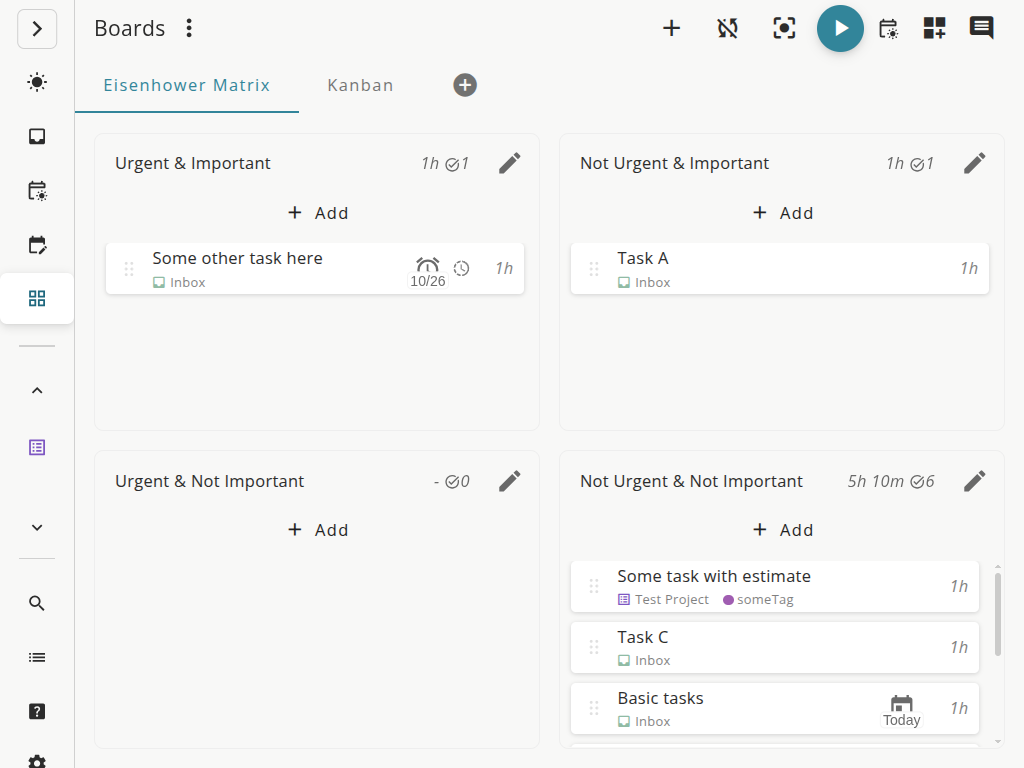
The Eisenhower matrix splits work along two axes, urgent and important, into four quadrants:
| Urgent | Not urgent | |
|---|---|---|
| Important | Do now | Schedule it |
| Not important | Delegate / shrink | Drop it |
The value here is seeing priority laid out, not just thinking about it. Placing each task makes the “not important but loud” items visibly demotable instead of secretly running your day. For the full method – including how to triage bugs, features, and tech debt – read the Eisenhower Matrix guide, and for why urgency hijacks ADHD priorities in the first place, see the ADHD priority paradox.
Once the grid is in front of you, it also breaks the “what do I do right now” freeze we cover in ADHD task paralysis strategies: a task sitting in the “Do now” quadrant has already made the choice for you.
3. Calendar / scheduled view: see where the time goes
Boards show what. Matrices show what matters. Neither shows time – and time is the thing many ADHD brains struggle to feel.
A calendar or scheduled view renders your day as blocks with real width. Suddenly “I’ll do all of this today” collides with the fact that the blocks do not fit. That collision is uncomfortable and completely necessary.
- Estimate, then schedule. Give tasks a rough duration and drop them onto the day. Overcommitment becomes visible before 4 PM instead of after.
- Leave whitespace. Unscheduled gaps absorb the inevitable detour, the long bug, the surprise meeting.
- Let it externalize time. As Timeboxing for ADHD puts it, the scheduled view makes time visible when your internal sense of it is unreliable.
If you want the deeper trade-off between an open list and a planned calendar, Calendar Blocking vs. To-Do Lists covers the hybrid that works best.
How to combine the three without overwhelm
Three views can become three new things to maintain – the opposite of helpful. Tie each one to a moment, not a habit you have to remember:
- Morning – calendar view. Pull a realistic handful of tasks onto today. If they do not fit, cut now.
- During work – Kanban board. Live here. Move one card to “Doing,” finish it, move it to “Done.” Resist starting a second.
- When stuck or scattered – Eisenhower matrix. When everything feels urgent and you freeze, switch to the matrix for sixty seconds to re-sort, then go back to the board.
The rule is one view per question. You are not running three systems; you are looking at the same tasks through whichever lens answers the question in front of you.
Setting up visual task management in Super Productivity
Super Productivity was built for exactly this kind of view-switching, and it is free and open source. Its customizable boards let you flip between a Kanban board, an Eisenhower matrix, compact lists, or a custom layout without ever leaving your tasks behind. The scheduled planner view turns the same tasks into a time-aware day, and calendar integration drops your real commitments alongside them.
Because the data is one shared task list underneath, you are never copying items between tools. Add a time estimate once, and it shows up whether you are looking at the board or the day. Time tracking runs quietly in the background, so over a few weeks the gap between “I’ll just knock this out” and how long it actually took starts to close on its own.
Next Moves
- Today: Build a three-column board and cap “Doing” at two cards. Notice how fast it fills.
- Tomorrow morning: Estimate your day in the scheduled view before you start. Cut whatever does not fit.
- Next time you freeze: Open the Eisenhower matrix and place five tasks. Do the one in “Do now.”
You do not need more discipline to hold all of this in your head. You need to stop trying to – and let the view hold it instead.
Related Resources
- ADHD Productivity Guide — the full system these visual views fit into
- Eisenhower Matrix Guide — how to prioritize when everything feels urgent
- Timeboxing for ADHD — making time visible when your internal clock is unreliable
- ADHD Hyperfocus at Work — channeling the flip side of an inconsistent attention system
References
- National Institute of Mental Health. Attention-Deficit/Hyperactivity Disorder (ADHD).
- Centers for Disease Control and Prevention. About ADHD.
Frequently Asked Questions
What is visual task management for ADHD?
Visual task management for ADHD means showing your work and your time as something you can see – Kanban columns, an urgent/important matrix, or a calendar – instead of a hidden list. Many ADHD brains experience tasks as "out of sight, out of mind," so making work visible reduces the chance a commitment quietly drops off.
Which view is best for ADHD: Kanban, Eisenhower, or calendar?
They solve different problems. A Kanban board shows what is in progress and limits how much you start at once. An Eisenhower matrix shows what actually matters when everything feels urgent. A calendar or scheduled view shows where your time goes. Most ADHD workflows benefit from using all three at different moments of the day.
Why do to-do lists fail for ADHD?
A flat to-do list hides three things ADHD brains need: how much is already in progress, what matters most, and how much time you really have. Items scroll off-screen and disappear from attention. Visual views keep those signals on screen so the list cannot quietly pile up out of view.
Does Super Productivity have a Kanban board and Eisenhower matrix?
Yes. Super Productivity ships customizable boards – you can flip between a Kanban board, an Eisenhower matrix, compact lists, or your own layout – plus a scheduled planner view and calendar integration, all free and open source.
Related resources
Keep exploring the topic
ADHD & Focus Patterns
Build gentle routines, dopamine-aware reminders, and quiet work blocks that actually stick.
Read moreThe ADHD Priority Paradox: Why Important Tasks Feel Hard
High-importance, low-urgency tasks trigger ADHD paralysis. Learn why your brain ignores what matters most and how to make important work feel urgent without crisis.
Read moreBody Doubling for ADHD: Why Someone Nearby Helps
You couldn't start the task alone, but the moment someone sat nearby you finished it in 20 minutes. That's body doubling -- and psychology offers plausible reasons why it helps many ADHD brains.
Read moreStay in flow with Super Productivity
Plan deep work sessions, track time effortlessly, and manage every issue with the open-source task manager built for focus. Concerned about data ownership? Read about our privacy-first approach.

About the Author
Johannes is the creator of Super Productivity. As a developer himself, he built the tool he needed to manage complex projects and maintain flow state. He writes about productivity, open source, and developer wellbeing.